2-Way Diff or 3-Way Merge: Choosing the Right Method for Version Changes
A Simple Guide to Comparing Changes From One or Multiple Contributors
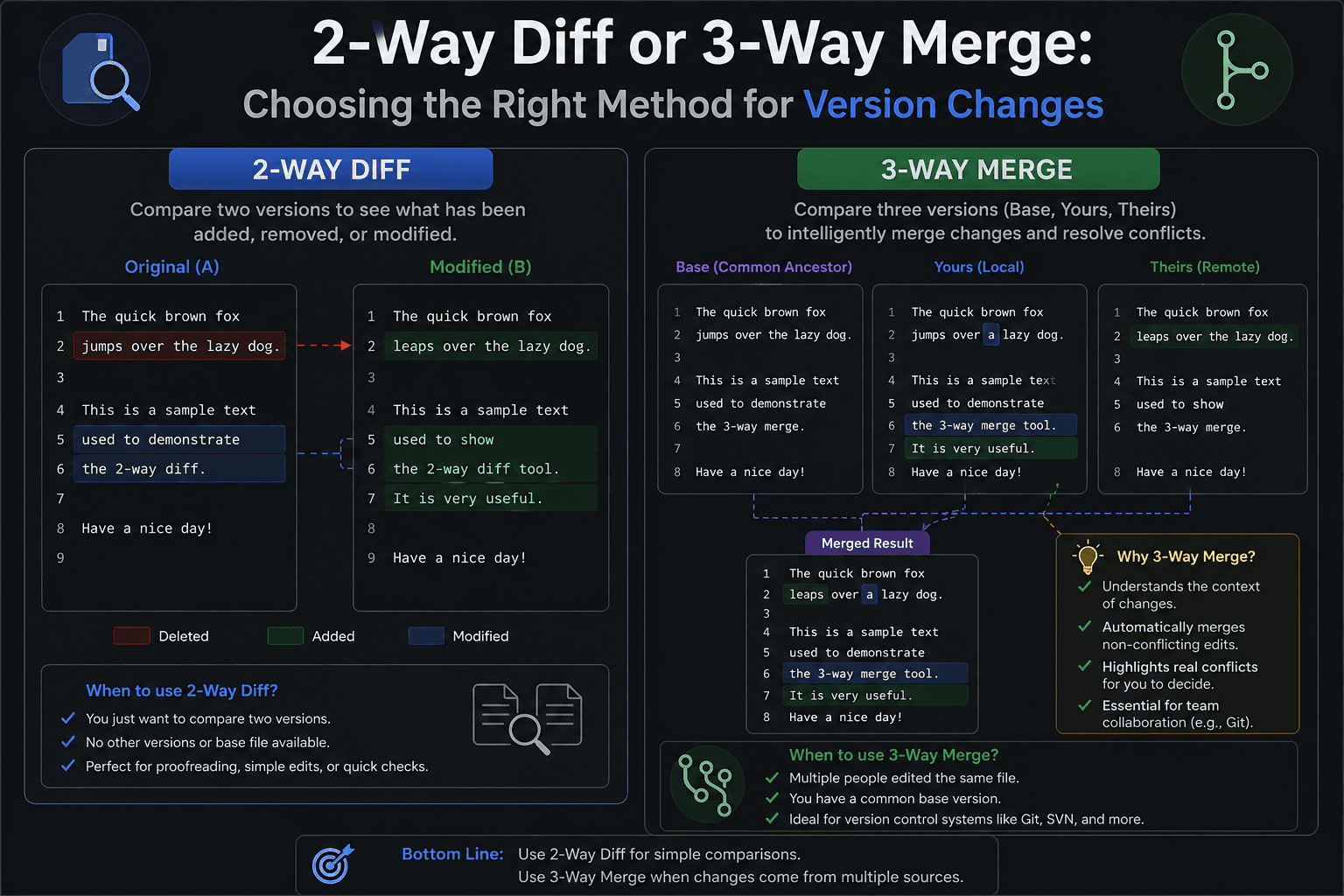
Comparing two files and combining edits from multiple people are related tasks, but they are not quite the same. A two-way comparison focuses on the differences between two versions. A three-way merge adds an earlier shared version to provide context when separate edits need to be brought together. Knowing the difference can make document reviews, collaborative editing, and source-code maintenance easier to manage.
How Does 2-Way Comparison Differ From 3-Way Merging?
A two-way comparison places two versions next to each other and shows where their content differs. It is useful when you simply want to find changes between an older copy and a newer one. A three-way merge works with three inputs: a shared starting version and two versions that were edited independently. The starting version helps determine which changes came from each side, making it easier to identify edits that can be combined and areas where a decision is required.
How to Work With a Three-Version Merge
- Open the three-way comparison or merge workspace in Text Differ.
- Add the earlier shared version that both edited copies were originally based on.
- Place the first contributor's version in one comparison panel.
- Add the second contributor's version to the remaining panel.
- Examine the generated result to see which edits can be brought together.
- Review sections where both versions changed the same content and decide which revision should remain.
- Copy the completed result when the combined document has been reviewed.
Useful Features for Comparing and Combining Versions
- Three-Version Workspace: Keep the shared starting copy and both edited versions available at the same time for easier review.
- Clear Change Visibility: See how the two edited versions differ from the earlier content instead of examining each file in isolation.
- Conflict Review: Identify areas where separate edits affect the same section and require a manual decision.
- Combined Result: Review the document produced after compatible changes have been brought together.
- Flexible Content Support: Compare written documents, source code, structured text, and other supported content using the comparison interface.
- Browser-Based Processing: Work with your comparison directly through the browser without needing a separate desktop diff application.
When Should You Use 2-Way Diff or 3-Way Merge?
- Use 2-Way Diff for Straightforward Reviews: Two versions are usually enough when your main goal is to find what was added, removed, or changed between them.
- Use 3-Way Merge for Separate Edits: A third reference version becomes useful when two people have worked independently from the same earlier copy.
- Keep Independent Changes Visible: The shared starting point provides additional context and makes it easier to understand where competing revisions came from.
- Reduce Unnecessary Manual Editing: A structured merge process can help you combine compatible updates without repeatedly copying content between separate files.
- Make Collaboration Easier to Manage: Developers, writers, editors, and other teams can use the appropriate comparison method based on how their documents are being revised.
Conclusion
A two-way diff is a practical choice when you need to inspect the differences between two versions. A three-way merge is more suitable when separate contributors have edited copies that originated from the same earlier version. Understanding when to use each approach can make version reviews more organized and reduce the effort required to combine collaborative changes.